How to Check Ufone Number? Ufone Number Check Code (2026)

Forgot your Ufone SIM number and have no balance left to call anyone? Don’t worry — you don’t need any credit to find it. Using the right Ufone number check code, you can see your own number on screen in seconds. In this guide we cover every working method for Ufone SIM number check in 2026, from USSD codes to SMS, the helpline and even online options. Whether you searched for a simple code or “ufone number check karne ka tarika”, one of the four methods below will get you your number instantly.
How to Check Ufone Number? Ufone Number Check Code
There are four easy methods to check your Ufone number, and most of them are completely free even with zero balance. Pick whichever one suits you below.
Method 1: Ufone Number Check Code (*780*3#)
The fastest Ufone number check code is *780*3#. It is free of cost and works on every prepaid and postpaid connection, even when your SIM has no balance or data.
- First, open the Phone dialer on your phone.
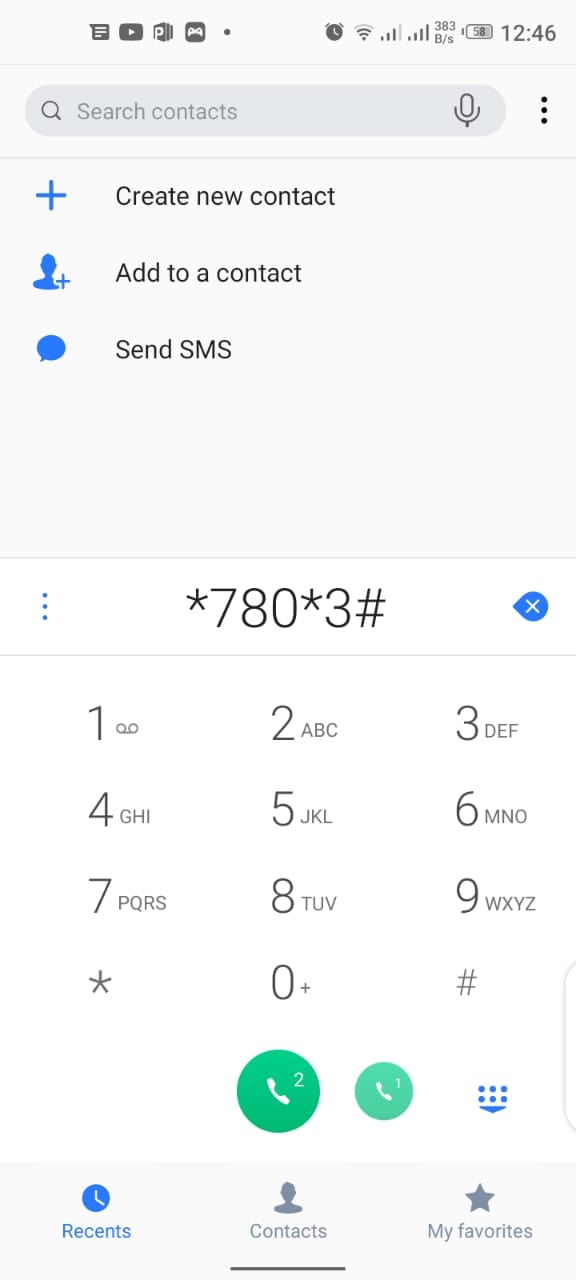
- Then dial *780*3# and tap on the call icon.
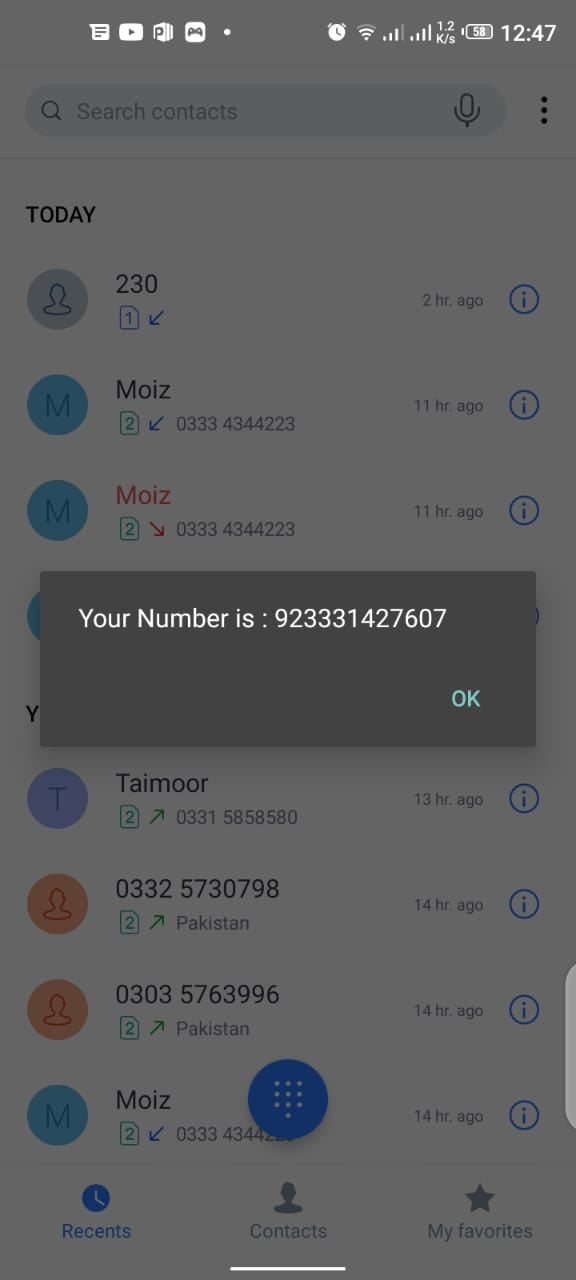
- Afterward, your Ufone number will appear on your screen, exactly as shown in the image above.
Method 2: Check Ufone Number via SMS (MNP to 667)
If you also want the SIM ownership details, you can use the SMS method to check your Ufone number and see who the connection is registered to.
- Open the messaging app on your phone and compose a new message.
- Afterward, write MNP in the text and send it to 667.
- After some time, you will receive a message from the service with details about your Ufone number, including the activation date and SIM owner name.
- Point to remember: this isn’t a free method and will incur some charges, so make sure you recharge your number before availing the service.
Method 3: Quick Ufone Number Check Code (*1#)
This is the simplest Ufone SIM number check code of all. It is free and instant, making it a handy alternative if the first code doesn’t respond on your handset.
- Open the keypad dialer on your phone.
- Afterward, dial *1# and your Ufone phone number will appear on your screen right away.
Method 4: Call the Ufone Helpline (333)
Ufone customers can also dial 333, the Ufone helpline, to check all the details of their SIM number. You will need to follow the instructions provided by the operator carefully and provide the details asked of you. The operator will then share information such as the SIM owner’s name, mobile number and other connection details with you. This method is useful if none of the USSD codes work on your device.
How to Check Ufone Number Online (My Ufone App)
Many people search for a Ufone SIM number check online option instead of a dialer code. The easiest way is through the official My Ufone app or the Ufone website. Simply install the app, log in with your account credentials, and your registered Ufone mobile number will be displayed in your profile along with your remaining balance, package and other account information. The app is also handy for recharging, subscribing to bundles and managing your connection in one place.
How to Check Ufone SIM Owner Name and Details
Sometimes you don’t just need the number — you need to know who a Ufone SIM is registered to. To check the owner name and activation details of a Ufone SIM, send an SMS with MNP to 667, or call the helpline at 333. The service returns details such as the owner’s name and activation date for the number registered on that CNIC. This is helpful when you buy a used connection or want to confirm that a SIM issued on your CNIC actually belongs to you.
Why You Should Know Your Ufone Number
Knowing your own Ufone number is more useful than it sounds. You need it to share your contact with family and friends, to register for mobile wallet and banking apps like UPaisa, and to top up or subscribe to bundles correctly. It also helps to keep an eye on your account — for example, you can check your Ufone balance and pick the right Ufone call packages once you know which number you are managing. Using a different network? You can also check your Jazz number the same way.
About Ufone:
Ufone is one of the premium telecom operators working in the country. It has always focused on the citizens of Pakistan, providing them with the most relevant communication modes and services and simplified tariffs with no hidden charges. Ufone is also our national telecom service provider and a subsidiary of Pakistan Telecommunication Company Limited (PTCL), though it operates as an autonomous body. As the world of telecommunications progresses, Ufone continues to expand its 4G coverage and services across Pakistan.
FAQs – Ufone Number Check Code
What is the Ufone number check code?
The main Ufone number check code is *780*3#. Just dial it from your Ufone SIM and your number appears on screen instantly. You can also dial *1# as a quick alternative. Both codes are free and work even when you have zero balance on your connection.
How can I check my Ufone number without balance?
You can check your Ufone number without balance by dialling *780*3# or *1# from your handset. These USSD codes are completely free, so your Ufone SIM number is displayed on screen even if you have no credit or mobile data available at the time.
How do I check my Ufone number online?
To check your Ufone number online, log in to the My Ufone app or the Ufone website using your account details. Once signed in, your registered Ufone mobile number is shown in your profile or account section, along with your package and balance information.
How can I find the owner name of a Ufone SIM?
To find the owner name of a Ufone SIM, send an SMS with MNP to 667, or call the Ufone helpline at 333. The service shares SIM details such as the owner’s name and activation date for the number registered on that CNIC.
Ufone number check karne ka tarika kya hai?
Ufone number check karne ka sabse asaan tarika *780*3# dial karna hai. Ye code bilkul free hai aur aapka Ufone number turant screen par show ho jata hai. Aap *1# bhi dial kar sakte hain ya helpline 333 par call kar sakte hain.
Is checking my Ufone number free?
Yes, checking your Ufone number with the *780*3# and *1# USSD codes is completely free, even with no balance. The SMS method (MNP to 667) and some helpline services may carry standard charges, so keep a little balance for those options.
Mobile Phone Taxes Portal
Find the PTA Taxes on All Phones on a Single Page using our Taxes Portal.
Note: Mobile phone tax rates and calculations fall under the jurisdiction of the Federal Board of Revenue (FBR), not the Pakistan Telecommunication Authority (PTA).
Explore NowFollow us on Google News!